


Anker 12-in-1 Dock Falls To $174 On Amazon Sale
Anker cuts thirty percent off its twelve-in-one aluminum monitor riser dock on Amazon, lowering the retail price to $174 for remote workstations needing unified connectivity.
Umar Abubakar | 9 Sept. 2026 · 6 min read

Working out of rented spaces and makeshift home offices across three continents over the past decade, I have fought an unending war against desk wire chaos. Every time a consumer upgrades to an ultra-thin laptop, hardware designers celebrate shedding chassis bulk by eliminating full-sized ports, leaving the buyer to purchase a drawer full of plastic dongles, loose cables, and bulky wall bricks. When multiple display cords, external SSD storage, mechanical keyboards, and phone charging pucks fight for space, the modern workstation ends up looking like an exploded electrical substation. That mess is not just an aesthetic annoyance; it drains mental focus and chips away at daily productivity. Hardware makers have attempted to bundle these accessories before, but few have managed to integrate physical desk posture with high-speed silicon routing into one cohesive aluminum frame.
Accessory manufacturer Anker has discounted its 675 USB-C docking station down to $174, taking a thirty percent cut from its standard $250 retail price on Amazon. The limited clearance markdown trims $76 off the desktop peripheral, delivering the lowest recorded price tracker figure for the all-in-one workstation hub. By combining an aircraft-grade aluminum monitor shelf with twelve physical connectivity ports and a built-in wireless charging pad, the unit addresses both ergonomic display elevation and peripheral cord consolidation through one unified desktop fixture.
My years inspecting consumer electronics have taught me that multi-port hubs frequently cut corners on internal power delivery chips or skimp on heat dissipation, causing hardware connections to drop unexpectedly under heavy data transfers. With this unit, the engineering approach feels deliberate. Rather than dangling a hot plastic brick behind a screen, the design team built the connection circuits directly into the structural aluminum legs of the monitor riser, using the metal chassis as an enormous heatsink while lifting the external monitor to natural eye level.
The Anatomy of Unified Desk Connectivity
To understand why this clearance deal attracts attention from remote professionals, one must look at how modern laptops communicate with office peripherals. The dock links to the host computer through a single upstream USB-C cable tucked underneath the metal frame. That solitary umbilical cord provides up to 100W of dynamic power delivery, easily supplying enough wattage to charge a 16-inch work machine while routing audio, video, network packets, and file transfers back and forth without extra wall chargers.
The unit separates its ports into two zones based on how often you interact with them. On the underside, out of direct line of sight, sit the permanent workstation connections: an HDMI 2.0 port outputting 4K resolution at 60Hz, a Gigabit Ethernet jack for steady wired local networks, a secondary USB-A port for continuous peripheral dongles, the main DC power input from an external 180W supply, and the host laptop connection. Cables running to wall sockets, routers, and monitors remain hidden under the rear lip, preventing visual clutter from spilling across the desk surface.
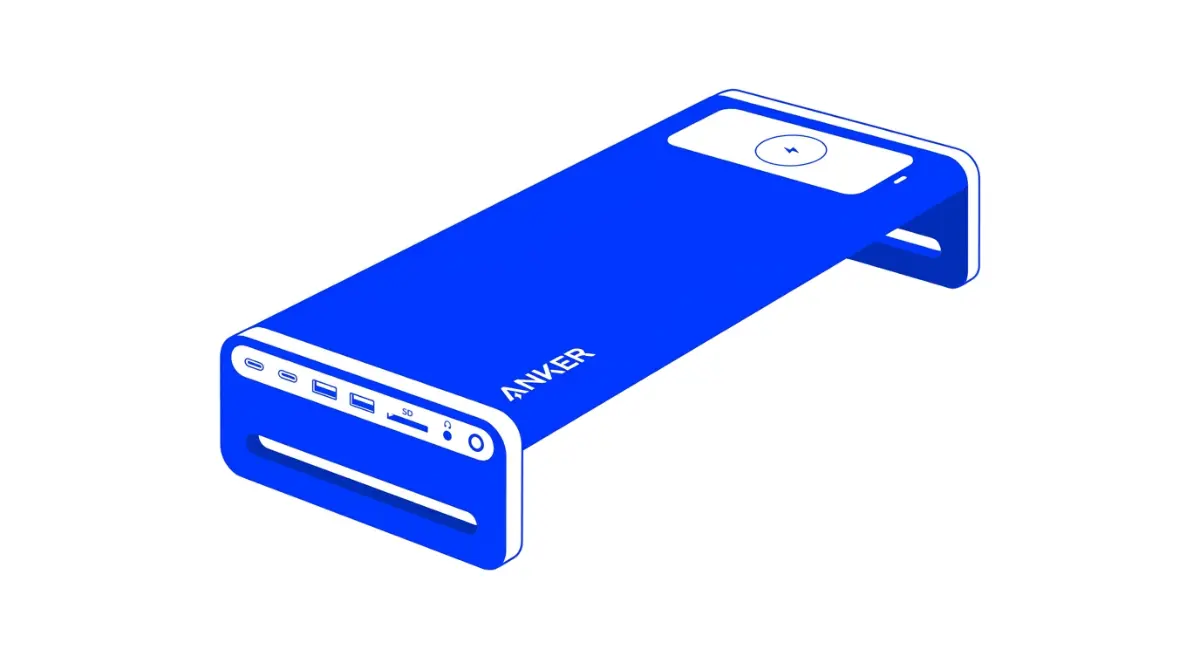
The outward-facing left flank houses the quick-access expansion slots that professionals need during active workdays. It holds two 10Gbps USB-C ports with 45W combined power delivery, two 10Gbps USB-A sockets for portable flash drives, dedicated SD and microSD flash memory readers transferring data at UHS-I rates, and a 3.5mm headphone and microphone combo jack. By placing high-frequency insertion ports on the side edge, users avoid awkward blind fumbling behind monitor screens to copy memory cards or plug in wired testing headsets.
Ergonomic Utility and Physical Cable Routing
Beyond electrical specifications, the physical dimensions of the aluminum shelf solve an everyday physical strain issue. Raising a display monitor approximately three inches off the desk aligns the top third of the screen with resting eye level. That simple vertical adjustment prevents prolonged neck tilting and back hunching, an occupational hazard familiar to programmers, editors, and financial analysts who sit before digital displays for ten hours straight.
The aluminum bridge is rated to support up to 22 pounds, easily holding heavy 27-inch and 32-inch commercial flat panels or wide productivity displays without structural sag. Underneath the raised arch, a 20-inch recessed gap provides dedicated storage room to slide a full-sized mechanical keyboard, mouse pad, or closed laptop completely out of the way when the workday concludes. This structural clearance transforms a busy computer station into a clean, flat writing desk within seconds.
On the top-right surface of the aluminum plate sits a flush Qi wireless charging pad, complete with a small status LED. The pad outputs 7.5W for Apple iPhones and up to 10W for compatible Samsung Galaxy smartphones, giving users a permanent resting place to recharge personal mobile devices without hunting for loose charging cords. Having wireless inductive coils directly beside the display keeps message alerts visible without cluttering valuable mouse territory.
Weighing the Single-Display Tradeoff
Despite its versatile feature list, the 675 docking station makes a few distinct functional compromises that prospective buyers must evaluate before purchasing. The most notable constraint centers on external display limits. The rear panel carries only one HDMI 2.0 port. While that connection drives a single 4K monitor at a smooth 60Hz refresh rate, the dock cannot natively run two independent external displays, because the USB-C side ports pass data and power only, lacking DisplayPort alternate mode routing.
For day traders, software developers, or creative video editors who require two or three dedicated monitors spread across their visual field, a single HDMI port will prove limiting unless they route extra screens through distinct laptop ports. Furthermore, while the side USB ports hit rapid 10Gbps transfer rates, they do not support Thunderbolt 4 or USB4 protocols, meaning high-end external graphics enclosures or ultra-fast NVMe storage arrays will run below their theoretical ceiling.
Cost has also remained a stumbling block throughout the product’s commercial lifecycle. At its original $250 retail list price, buyers could easily compare the stand against standalone metal risers paired with detached USB-C hubs and pocket some change. Yet at $174 during this clearance discount, that price differential vanishes. Acquiring an aircraft-grade aluminum stand, a 180W power supply, a 100W laptop charger, a 10Gbps multi-port hub, and a wireless desktop charger as separate accessories often ends up costing more while multiplying desk cords.
Consolidation Rules the Modern Workstation
The broader push toward unified desktop hardware highlights how consumer tech habits have matured. Over the past five years, remote work moved from a temporary contingency plan into a permanent structural reality for millions of global workers. As corporate employers downsize central physical offices and shift operating burdens onto individual workers, home workstations have become serious productivity centers that require commercial-grade equipment.
Hardware developers recognize that modern consumers no longer tolerate ugly industrial solutions in their living spaces. This reflects consumer appetite shifts across categories, seen when manufacturers rethink personal devices during our Dell 14s laptop MacBook Neo alternative IFA 2026 coverage, or when intelligent hardware redefines household tools in our Dyson unveils Camerajet Nurovi robots intelligent machines overview. In every consumer gadget category, thoughtful industrial design and seamless usability have become the baseline expectation rather than an optional luxury.
For remote professionals working from a single laptop and one high-resolution display, Anker’s discounted twelve-in-one stand delivers an elegant answer to peripheral sprawl. The $174 price tag will not remain forever as Amazon works through its seasonal inventory push, but while units remain in stock, it offers an exceptional chance to clean up desktop wire clutter once and for all.
Read More on TechRobust:

Umar Abubakar
 LinkedIn
Umar Abubakar
Expertise:Editorial Leadership, Product Design (UI/UX), Digital Media Strategy, Technology Systems, Product Architecture
Award:TechRobust Visionary Leader of the Year 2025
Umar serves as Editor-In-Chief and CEO of TechRobust, combining editorial vision with senior product design expertise to shape how modern technology stories are built, packaged, and told. Overseeing all editorial verticals, he directs coverage across global and regional tech landscapes while applying deep design thinking to publication strategy and reader experience.